


CFMOTO RIDESYNC
4.5398.00 Reviews
App Specs
- Version
- 1.0.7
- Updated On
- License
- Free
- Downloads
- 10,000+
- Developer
- CFMOTO Powersports, Inc.
- Categories
- Auto & Vehicles
- Platform
- Android
Screenshots
 Analysis by AppCompare
When I look at a connected vehicle app, I want it to do more than place a digital badge beside my motorcycle. I want it to make ownership easier: help me understand the machine, keep software current, and turn a ride into something I can review afterward. That is the promise behind CFMOTO RIDESYNC, a free Auto & Vehicles app from CFMOTO Powersports, Inc. My overall view is positive, but with an important qualification: it makes the most sense for someone who already owns a compatible CFMOTO ride and wants a central companion for it, not for a casual motorcyclist looking for a universal riding tool.
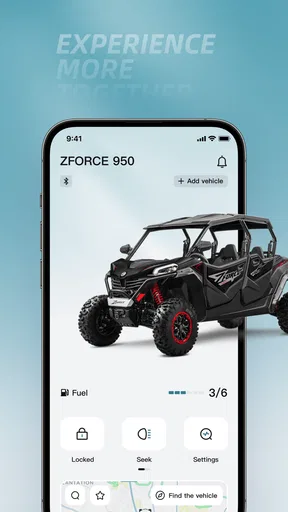
The app’s core idea is straightforward. It connects with the vehicle, supports updates, and gives the rider a way to examine ride-related information. That combination is more useful than it first sounds. A motorcycle can be perfectly enjoyable without an app, yet ownership often involves small jobs that are easy to postpone: checking whether the digital side of the machine is current, looking back at a trip, or making sense of information that is difficult to interpret from the vehicle alone. RIDESYNC brings those tasks into one place instead of leaving the owner to rely on separate tools.
What the connected experience gets right
I find the connected approach most useful when I treat it as part of ownership, not as something to fiddle with while gearing up. Getting familiar with the app during a quiet moment can make later checks feel routine, and it helps me judge whether that digital layer genuinely suits my riding habits. From there, the key decision is whether its focused CFMOTO role is a better fit than a broader riding tool.
A practical companion rather than a novelty screen
My strongest impression is that the app is built around ownership rather than entertainment. The connection is the starting point, but the real value comes from what that connection allows afterward. If I am preparing for a weekend ride, I do not need another social feed or a wall of decorative statistics. I need confidence that the app can communicate with my vehicle, help me keep its software up to date, and present useful ride information in a form I can inspect later.
That focus gives the app a clearer purpose than many generic motorcycle utilities. A general trip tracker may record movement, but it is not necessarily tied to the vehicle itself. A navigation app may be excellent at directions, yet it does not replace a manufacturer-oriented connection for updates and ride analysis. CFMOTO RIDESYNC sits in the space between those options: it is less universal than a standalone riding app, but more relevant to the day-to-day relationship between a CFMOTO owner and the machine.
I also appreciate the potential for a single workflow. Instead of treating updates as a workshop-only concern and ride information as something to gather through another application, the owner can begin with the same companion app. That does not eliminate every reason to visit a dealer or consult the vehicle’s documentation, but it can reduce the number of disconnected steps involved in ordinary ownership.
Why software updates matter in real ownership
The update function is easy to overlook because it is not as exciting as reviewing a route. In practice, it may be one of the most important parts of the app. Connected vehicles depend on software for parts of their digital experience, and an owner benefits when keeping that software current is visible and manageable rather than mysterious.
Worth Reading Before You Choose

EA SPORTS FC Mobile 26 Is a Bigger Football Game, but It Takes Time

Flipboard Shows What News Apps Must Do Beyond the Feed

Switching to Android Auto Means Rethinking Your Driving Routine

Google Calendar Makes a Crowded Week Easier to Manage

Ludo King Makes the Most of the Minutes Between Plans

Baby Panda World Brings Quick Play to Modern Phones, but Its Game Library Feels Busy
I would use the app before a planned trip as part of a short preparation routine. The bike is fueled, tires are checked, riding gear is ready, and the connected system is given a quick look. That does not turn a phone into a mechanic, and it should not encourage anyone to skip physical safety checks. It does, however, create a sensible digital checkpoint before setting off. The useful insight here is that an update tool is most valuable before a problem appears, not after a rider is already away from home.
There is also a trade-off. Software maintenance is rarely the feature people open an app for every day. Its value is occasional and preventative, so the app may feel quiet between rides or update checks. I see that as acceptable for an ownership companion, but users expecting constant activity may find the experience less engaging than a navigation or fitness application.
Ride analysis can change how a rider remembers a trip
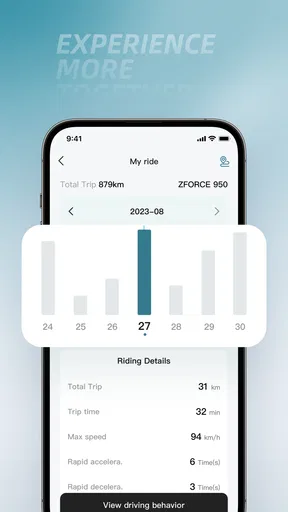
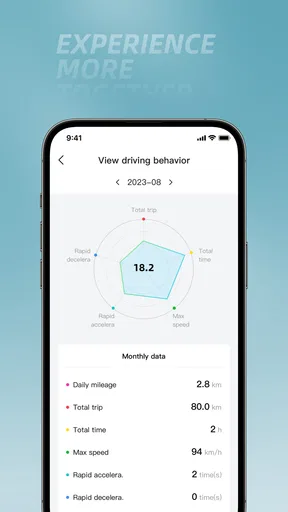
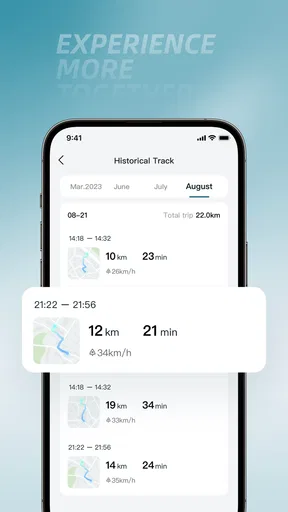
The analysis side gives the app a reason to remain useful after the ignition is off. A ride can feel memorable without any records, but reviewing it later can reveal patterns that are difficult to notice while riding. I might remember a route as smooth and relaxed, then discover that the day involved more stop-and-start sections than expected. I might also compare a familiar commute with a longer recreational outing and think more clearly about how each one uses my time and attention.
For me, the best use is not obsessing over every number. It is using the information to make better decisions about future rides. If a route repeatedly produces an unsatisfying rhythm, I can rethink it. If a particular outing worked well, I can use the record as a reference for planning another day. This turns analysis into a planning aid rather than a scoreboard.
A less obvious benefit is troubleshooting through context. When something about a ride feels unusual, having ride information available may help me describe the situation more clearly when I speak with a technician. It is not a substitute for professional diagnosis, and I would not treat app information as proof of a mechanical fault. Still, a record of what happened can be more useful than trying to reconstruct a ride from memory.
The app’s reception and accessibility
CFMOTO RIDESYNC has an average rating of 4.4 from around nine hundred ratings, with close to four hundred written reviews. That suggests a generally favorable response while still leaving room for different experiences across phones, vehicles, and riding habits. I would not treat the rating as a guarantee, but it is a reassuring sign for an app that depends on a successful connection between hardware and software.
It is also free, which lowers the barrier to trying it for an eligible owner. The Everyone content rating makes it approachable for a broad audience, although the practical question is not age so much as ownership: the app’s usefulness depends on having a CFMOTO vehicle that can make meaningful use of its connected functions.
The application was released on April 4, 2024, and the current version is 1.0.7. It supports Android 7.0 and later, so owners using an older but still supported Android phone are not automatically excluded by a demanding operating-system requirement. That broad compatibility is helpful, especially for riders who keep a reliable older phone rather than upgrading every year.
Three smart ways I would use it
First, I would make it part of a pre-ride digital check rather than opening it only when something goes wrong. Checking the connection and looking for available software maintenance before a longer trip is a small habit with a sensible payoff. I would do this at home, while the phone and vehicle are close together, rather than waiting until I am parked somewhere inconvenient.
Second, I would use ride analysis as a comparison tool between types of riding. A short daily trip and a relaxed weekend route serve different purposes, so comparing them can help me understand which roads and schedules actually suit me. The useful question is not “Did I collect impressive figures?” but “What should I repeat, change, or avoid next time?”
Third, I would review a ride soon after finishing it if I wanted to remember a route accurately. Waiting too long makes every journey blend into the next one. A quick review can preserve useful context while the roads, stops, and conditions are still fresh in my mind. This is especially practical for someone exploring local roads and gradually building a personal list of routes.
Where the experience may become frustrating
The biggest weakness is inherent in the product’s connected nature: the app is only as dependable as the relationship between the phone, the vehicle, the software, and the user’s setup. A standalone app can often begin working immediately because it only needs the phone. A vehicle companion has more links in the chain. Pairing, keeping the phone nearby, handling update steps, and understanding what information is available can all affect how smooth the experience feels.
That matters most when I am in a hurry. If I open the app moments before leaving and discover that I need to reconnect or complete a maintenance step, the feature that should provide confidence becomes a source of delay. My practical advice is to establish the connection and explore the important screens before the first major ride. The app is easier to appreciate when it becomes familiar during a calm moment instead of being learned at the roadside.
Another limitation is scope. Because it is designed around CFMOTO ownership, it is not the best choice for a rider who changes between brands or wants one universal dashboard for several vehicles. A general navigation or tracking app may be more convenient for mixed ownership, especially if the main goal is route planning rather than vehicle connection and updates.
I would also keep expectations realistic about analysis. Having ride information available does not automatically make someone a better rider, and more detail is not always more insight. The app is most useful when I know what decision I am trying to make. Without that purpose, analysis can become a quick glance followed by no meaningful change. Riders who enjoy reviewing trips will get more from it than those who never look back after parking.
Who should install it, and who should look elsewhere
I would recommend it first to a CFMOTO owner who wants the manufacturer’s connected functions in one place. It is particularly well suited to riders who enjoy understanding their trips, prefer to keep vehicle software current, and want a digital record that can support future planning. New owners may also benefit because the app encourages them to become familiar with the connected side of the machine early rather than treating it as an optional extra.
It is a good fit for a rider with a regular commute as well as for someone who takes occasional longer trips. A commuter can use the analysis function to compare familiar journeys and make the routine more informative. A recreational rider can use it after an outing to remember what worked and prepare the next route more thoughtfully. In both cases, the value comes from repeated use, not from installing it once and forgetting it.
I would be more cautious about recommending it to someone who does not own a compatible CFMOTO vehicle. The app’s category and developer make its intended audience clear, and a generic motorcycle utility will likely offer more immediate value to a rider seeking broad compatibility. I would also point frequent travelers toward a dedicated navigation solution if turn-by-turn guidance is their main requirement. RIDESYNC complements that kind of tool rather than replacing every function it may provide.
Riders who dislike pairing devices or who want a completely manual, phone-free ownership routine may also prefer to skip it. There is nothing wrong with that choice. A connected app adds convenience for some people, but it also adds another digital layer to maintain. The right question is whether that layer solves a real problem in your riding life.
How it compares with the usual alternatives
Compared with a basic odometer or a paper service notebook, the app offers a more connected way to think about riding. Traditional methods remain simple and dependable, but they require the owner to remember details and enter them manually. RIDESYNC is more convenient when its connection works because the rider can return to a digital record instead of reconstructing every trip from memory.
Compared with a general GPS or route-recording application, it has a narrower but more vehicle-focused role. A navigation app is usually the better tool for finding a destination, exploring map options, or guiding a rider through unfamiliar streets. RIDESYNC is the better fit when the question is about the relationship with the CFMOTO itself: connection, software maintenance, and reviewing ride information in an ownership context.
Compared with doing everything through a dealer, the app can make routine digital tasks more accessible to the owner. That does not mean it replaces service expertise. Mechanical inspections, repairs, and safety concerns still belong in the hands of qualified professionals. The advantage is that the owner gains more visibility into the connected experience without turning every small software-related task into a separate appointment.
My verdict for everyday riders
After weighing the convenience against the setup friction, I see CFMOTO RIDESYNC as a focused companion with a clear audience. Its strongest case is not that it transforms every ride. Its strongest case is that it brings three useful ownership activities together: connecting with the vehicle, keeping the digital side current, and reviewing rides afterward.
The app has reached over ten thousand installs, which gives it a modest but meaningful presence for a manufacturer-specific tool. I would interpret that as evidence that it serves a defined group rather than as a reason for everyone to install it. Its value depends far more on owning the right CFMOTO vehicle and caring about connected ownership than on broad popularity.
My recommendation is simple: if you ride a compatible CFMOTO and want an easier way to stay involved with the vehicle beyond starting and stopping it, I think the free download is worth trying. Set it up before you need it, use updates as part of pre-ride preparation, and treat ride analysis as a way to improve planning rather than as a competition. If you only want universal navigation, avoid device connections, or ride several brands, a general-purpose alternative may suit you better.
In the end, CFMOTO RIDESYNC succeeds because it understands a specific ownership need. It is not trying to be every motorcycle app at once, and that focus is its advantage. I would not call it essential for every rider, but for the CFMOTO owner who wants a practical digital link to the machine, it is a sensible and approachable addition.
Pros
- Clear turn-by-turn navigation designed for CFMOTO riders.
- Connects compatible motorcycles for convenient ride data access.
- Helps monitor vehicle information from a single mobile dashboard.
- Useful trip-recording tools for reviewing routes and riding history.
- Supports a more connected experience between rider and motorcycle.
Cons
- Features depend heavily on compatibility with specific CFMOTO models.
- Bluetooth pairing may require repeated attempts in some situations.
- Navigation quality can vary with map coverage and phone connectivity.
- Background GPS use may noticeably reduce your smartphone battery.
- Some functions may be unavailable depending on region or motorcycle firmware.
FAQs for CFMOTO RIDESYNC
What is CFMOTO RIDE SYNC and what can I use it for?
CFMOTO RIDE SYNC is a companion app designed for compatible CFMOTO motorcycles and powersports vehicles. After pairing your smartphone with the vehicle, it can provide functions such as navigation, ride information, connected communication, vehicle status, and selected service or maintenance details. The exact features depend on the vehicle model, region, firmware, and the equipment installed on your CFMOTO.
Which CFMOTO vehicles and smartphones are compatible with RIDE SYNC?
Compatibility is not identical across every CFMOTO model. RIDE SYNC generally requires a supported vehicle with the appropriate connectivity system, dashboard, or accessory, while your phone must meet the app’s current Android or iOS requirements. Before downloading, check the official compatibility information for your motorcycle, confirm Bluetooth permissions, and make sure your operating system and app version are up to date.
How do I connect CFMOTO RIDE SYNC to my motorcycle?
To connect the app, install CFMOTO RIDE SYNC, create or sign in to an account if requested, enable Bluetooth and location permissions, and follow the in-app pairing instructions. The motorcycle may need to be switched on and placed in a specific connection mode. Pairing can fail if the phone is already connected to another device, so restarting Bluetooth, the app, or the vehicle may help.
Does CFMOTO RIDE SYNC provide navigation and can it work without mobile data?
The app may offer route planning, turn-by-turn guidance, or navigation information through the connected motorcycle display, depending on the model and regional version. Navigation commonly relies on your phone’s GPS and map data, so mobile data can be needed for live searches, traffic, and map updates. Downloaded or cached maps may provide limited offline assistance, but availability should be checked in the app.
Is CFMOTO RIDE SYNC free, and what permissions does it require?
CFMOTO RIDE SYNC is generally available to download without an upfront purchase, although connected services, regional features, or future options may vary. The app can request Bluetooth, location, notification, storage, and mobile-data permissions to support pairing, navigation, alerts, and ride records. Review the privacy policy and permission prompts carefully, and disable permissions you do not need, while remembering that some features may stop working.


